

Yes. Home Depot now takes Apple Pay at most of its stores. You can tap your iPhone or Apple Watch at the register or at self checkout. This is new though. For years the answer to does Home Depot take Apple Pay was no. That changed when the company started adding tap to pay in late 2024.
So if you searched this because a page told you Home Depot never takes Apple Pay you got old info. Let me clear it up. Below you will find where it works where it does not and how to pay in a few seconds.
The Short Answer
Here is the quick version so you can plan your trip.
- In store: Yes. Most Home Depot registers and self checkout lanes now accept Apple Pay.
- Online at HomeDepot.com: No. Apple Pay is not a checkout option on the website.
- In the Home Depot app: No. The app does not use Apple Pay for orders.
So does Home Depot accept Apple Pay? In person yes. For online orders you will need another method. More on that below.
Does Home Depot Take Apple Pay in Stores?
Yes it does now. Home Depot spent years as a big holdout. It had no tap to pay at all. Shoppers had to swipe or insert a card.
That ended in late 2024. Home Depot began rolling out contactless payment in its US stores. That rollout covers all tap options. So Apple Pay Google Pay and Samsung Pay all work through the same reader.
The rollout was gradual. It started at a small number of stores. Then it spread to most locations. Today most Home Depot stores let you pay by tapping your phone.
Look for the contactless symbol on the card reader. It looks like a small set of curved lines like a sideways wifi icon. If you see it the terminal can take your tap.
What About Self Checkout?
Self checkout works too. Scan your items. Choose to pay. Then hold your phone or watch near the reader.
Some older terminals may not be updated yet. If a tap does not go through just use your physical card instead.
Does Home Depot Do Apple Pay Online?
No. This is where people get tripped up. Home Depot take Apple Pay in the store but not on the website.
When you check out on HomeDepot.com you will not see an Apple Pay button. The same goes for the Home Depot app. There is no tap to pay for online orders.
For online orders you can use these instead:
- A credit or debit card
- PayPal
- A Home Depot gift card
- The Home Depot store credit card
PayPal is the main digital wallet online. If you like paying without typing your card number PayPal is your best bet on the site.
Why Was Home Depot a Holdout for So Long?
This part surprises people. Home Depot was actually one of the biggest Apple Pay partners when Apple Pay launched back in 2015. Then it pulled support and stayed away for years.
The most common reason people point to is the deal with PayPal. Home Depot leaned on PayPal early for digital payments. That focus likely pushed other wallets to the back of the line.
Its rival Lowe’s added Apple Pay first. Lowe’s started its rollout in late 2023. Many think that move put pressure on Home Depot to finally catch up.
Whatever the reason the wait is over. The tap readers are in most stores now.
How to Use Apple Pay at Home Depot
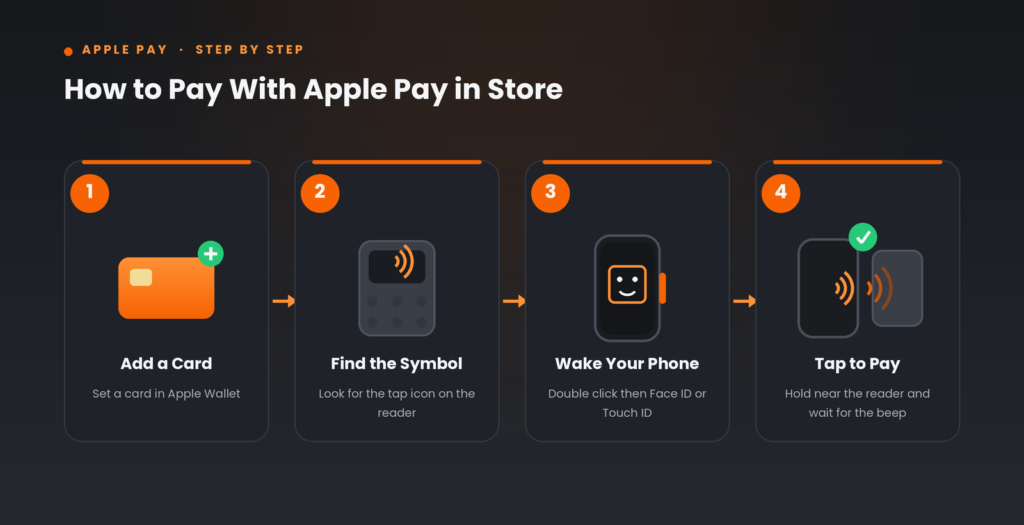
It takes a few seconds. Here is the simple flow at the register or self checkout.
- Make sure you have a card added in your Apple Wallet.
- At checkout look for the contactless symbol on the reader.
- Double click the side button on your iPhone. On older phones use the home button.
- Look at your phone to confirm with Face ID or Touch ID.
- Hold the top of your phone near the reader.
- Wait for the beep or the check mark. That means it went through.
With an Apple Watch double click the side button then hold the watch face near the reader.
One nice perk. If you pay with an Apple Card through Apple Pay you can earn 2 percent Daily Cash on the purchase.
What to Do If a Terminal Will Not Take Your Tap
Most readers work fine. Still a few older ones may not be set up yet. If your tap fails do not stress. You have backups.
- Insert or swipe a physical credit or debit card
- Pay with cash
- Use a Home Depot gift card
- Use the Home Depot store credit card
- Write a check if you still carry one
It is smart to keep a card on you as a backup. That way a slow terminal never slows you down.
Other Ways to Pay at Home Depot
Home Depot takes a wide mix of payment methods. Here is the full list for both store and online.
In store
- Apple Pay Google Pay and Samsung Pay by tap
- Credit and debit cards
- Cash
- Checks
- Home Depot gift cards
- Home Depot store credit card
- PayPal through the app or a QR code
Online
- Credit and debit cards
- PayPal
- Home Depot gift cards
- Home Depot store credit card
So you have plenty of choices either way. The only real gap is Apple Pay on the website.
Quick Tips Before You Shop
A few small things make checkout smooth.
- Set a default card in Apple Wallet so you do not fumble at the register.
- Charge your phone. A dead phone means no tap.
- Keep a backup card in your pocket for the odd store that is not updated.
- For big buys the Home Depot store card may offer special financing. Ask at the desk.
Frequently Asked Questions
Does Home Depot take Apple Pay at self checkout?
Yes. Most Home Depot self checkout lanes now accept Apple Pay. Scan your items then choose to pay and hold your phone near the reader. If the tap does not work use your card instead.
Does Home Depot accept Apple Pay online?
No. Apple Pay is not offered on HomeDepot.com or in the Home Depot app. For online orders use a credit or debit card PayPal or a Home Depot gift card.
Can I use my Apple Watch to pay at Home Depot?
Yes. Double click the side button on your Apple Watch then hold the watch near the contactless reader. It works the same as paying with your iPhone.
Why did Home Depot not take Apple Pay before?
Home Depot was a long time holdout. It leaned on PayPal for digital payments and did not add tap to pay for years. That changed in late 2024 when it began rolling out contactless payment across its US stores.
Do all Home Depot stores take Apple Pay now?
Most do. The rollout reached the large majority of stores after it started in late 2024. A small number of older terminals may still lack the tap reader so keep a backup card just in case.
The Bottom Line
If you have been avoiding Home Depot because of Apple Pay you can stop. Walk in tap your phone and go. Just remember the one catch. Apple Pay works in the store but not on the website or app. For online orders reach for PayPal or a card.
Next time you head out check that a card is set as your default in Apple Wallet. Then look for the little contactless symbol at the register. That is all you need for a quick tap and pay trip.